# You Can’t See the Full Customer Journey in HubSpot
Author: Team Zigment
Author URL: https://zigment.ai/blog/author/team-zigment
Published: 2026-01-27
Category: Hubspot
Category URL: https://zigment.ai/blog/category/hubspot
Tags: hubspot limitations, hubspot properties, hubspot workflows
Tag URLs: hubspot limitations (https://zigment.ai/blog/tag/hubspot-limitations), hubspot properties (https://zigment.ai/blog/tag/hubspot-properties), hubspot workflows (https://zigment.ai/blog/tag/hubspot-workflows)
URL: https://zigment.ai/blog/you-cant-see-the-full-customer-journey-in-hubspot
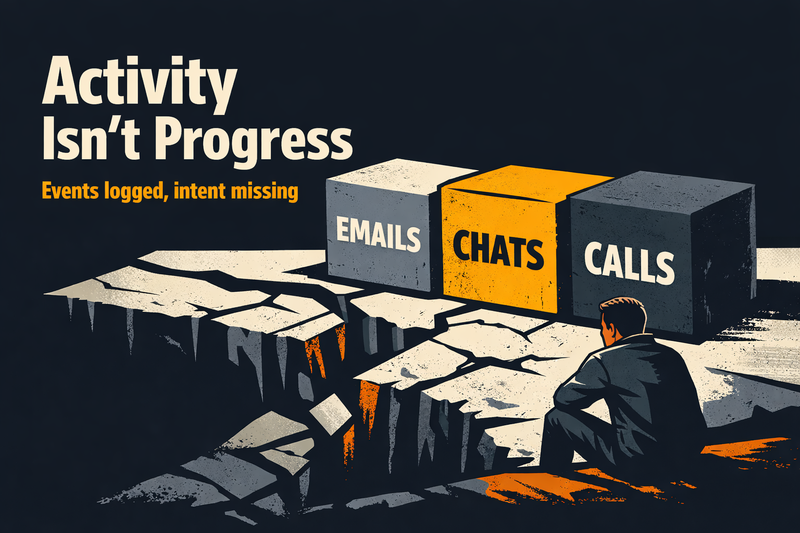
A prospect opens your email.
Replies with a question.
Chats with your website bot that same afternoon.
Then goes quiet.
HubSpot logs every one of those touches. Timelines look busy. Reports look healthy. Yet your deal stalls.
This is the gap we keep running into when teams rely on HubSpot alone to understand the customer journey. You can see _activity_, but you can’t see _progress_. You know **what** happened, but not **where the buyer actually is**.
And that blind spot is expensive.
We’ve seen RevOps teams with solid HubSpot marketing and automation still lose momentum because signals are scattered across email, WhatsApp, chat, sales calls, and support threads. The data exists. The meaning doesn’t.
In this article, we’ll break down exactly where the customer journey in HubSpot becomes invisible and what to do about it without ripping HubSpot out.
## **What HubSpot Sees vs. What It Can’t See in the Customer Journey**
> HubSpot is excellent at recording what happened. It was never built to judge what it means.
HubSpot gives you a lot.
It just doesn’t give you the _whole picture_.
### **What HubSpot Sees Clearly**
Out of the box, HubSpot does a solid job capturing activity:
- Contact timelines with emails, calls, meetings, and form fills
- Campaign-level attribution reporting HubSpot teams rely on
- First-touch and limited multi touch attribution HubSpot models
- Revenue influence reporting through multi touch revenue attribution HubSpot
For HubSpot marketing, this is powerful. You can track which campaigns sourced pipeline, which emails drove clicks, and which ads created demand.
That visibility is real and useful.
### **What HubSpot Can’t See**
Where things break is _between_ those events.
HubSpot doesn’t understand:
- Why a prospect replied “not now”
- Whether silence means disinterest or internal approval delays
- If urgency increased after a pricing call
- How sentiment shifted across channels
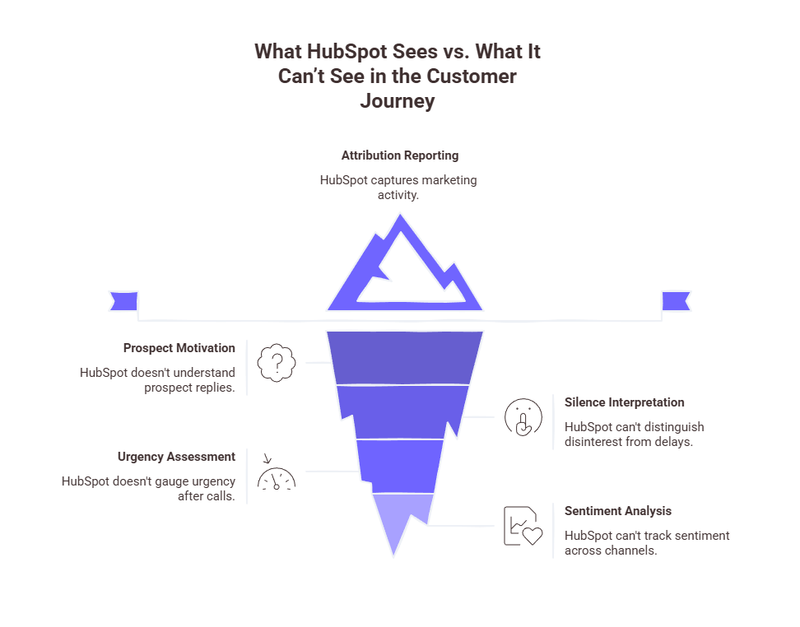
Attribution tells you _what influenced revenue_.
It doesn’t tell you _how the buyer moved through the journey_.
A contact can look “highly engaged” in reports while actually being stuck, hesitant, or quietly disengaging. HubSpot records interactions, not intent. Events, not momentum.
Connect with us to optimize
## **The Sources You Need to Stitch for Real Customer Journey Analytics in HubSpot**
If the customer journey lived entirely inside HubSpot, this problem wouldn’t exist.
But it doesn’t. And it hasn’t for years.
### **Where the Real Journey Data Lives**
To get meaningful customer journey analytics HubSpot can’t produce on its own, teams need to stitch together signals from multiple systems:
- **Product usage data**
Logins, feature adoption, drop-offs, and usage frequency
- **Customer support and success tools**
Tickets, escalations, CS notes, and sentiment cues
- **Billing and contract systems**
Renewals, upgrades, downgrades, payment delays
- **Data warehouses and BI layers**
- HubSpot Snowflake integration
- HubSpot to BigQuery pipelines
### **Why Stitching Data Still Falls Short**
Most teams stop at dashboards.
They build beautiful reports that answer:
- “What happened last quarter?”
- “Which channel performed best?”
- “Where did deals drop off?”
Those insights help with planning.
They don’t help in the moment.
Customer journey analytics without real-time decisioning creates hindsight, not leverage. By the time insights surface, the buyer has already moved or left.
## **The Journey Questions HubSpot Can’t Answer on Its Own**
Even with clean data and well-built workflows, there’s a moment where HubSpot simply runs out of judgment.
### **The Questions Revenue Teams Actually Need Answered**
These are the questions we hear from RevOps, marketing, and sales leaders every week:
- Should we **follow up now or give the buyer space**?
- Is this silence a lack of interest or a sign of internal evaluation?
- Did that email reply move the deal forward, or create friction?
- Is this lead ready for sales, or still exploring quietly?
HubSpot isn’t designed to answer these. It reacts to events opens, clicks, submissions not to meaning.
### **Why Automation Breaks at the Edges**
Marketing automation works best when behavior is predictable. Buyer journeys aren’t.
- A prospect clicks three emails but hesitates on a pricing call
- A buyer goes quiet on email, then reappears on WhatsApp
- A champion is engaged, while procurement slows everything down
HubSpot can trigger actions.
It can’t interpret situations.
Workflows fire because a rule was met, not because the moment is right. Over time, this creates noise instead of progress and buyers feel it.
Strategize your next moves
## **A Practical Playbook for Seeing the Full Customer Journey**
Once journey state is clear, orchestration becomes possible. Not theoretical. Not heavy. Practical.
Below is a playbook we’ve seen work repeatedly for B2B teams running HubSpot at scale.
### **1\. Centralize Conversations, Not Just Events**
Start with what buyers actually produce: conversations.
- Email replies
- Chat transcripts
- WhatsApp and SMS threads
- Sales call notes
Treat these as signals, not logs. Capture tone, hesitation, urgency, and intent—not just timestamps.
### **2\. Model a Small Set of Journey States**
Avoid complex funnels. Keep it human.
Examples:
- Actively evaluating
- Interested but blocked
- Waiting on internal alignment
- Ready for a decision
These states should update continuously as new interactions arrive.
### **3\. Decide First, Then Act**
Make decisions once, centrally:
- Should we follow up now?
- Which channel fits this moment?
- Does this need a human?
Then let HubSpot execute the action, email, task creation, routing, or suppression.
### **4\. Orchestrate Across Channels**
Buyers don’t care which tool you’re using.
Your system should:
- Pause emails when a sales conversation is active
- Switch channels when engagement shifts
- Prevent overlapping outreach from multiple teams
Consistency builds trust.
### **5\. Keep Humans in the Loop Where It Matters**
Not every moment should be automated.
Use human judgment for:
- High-value deals
- Sensitive objections
- Escalations or churn risk
Automation should support people, not replace them.
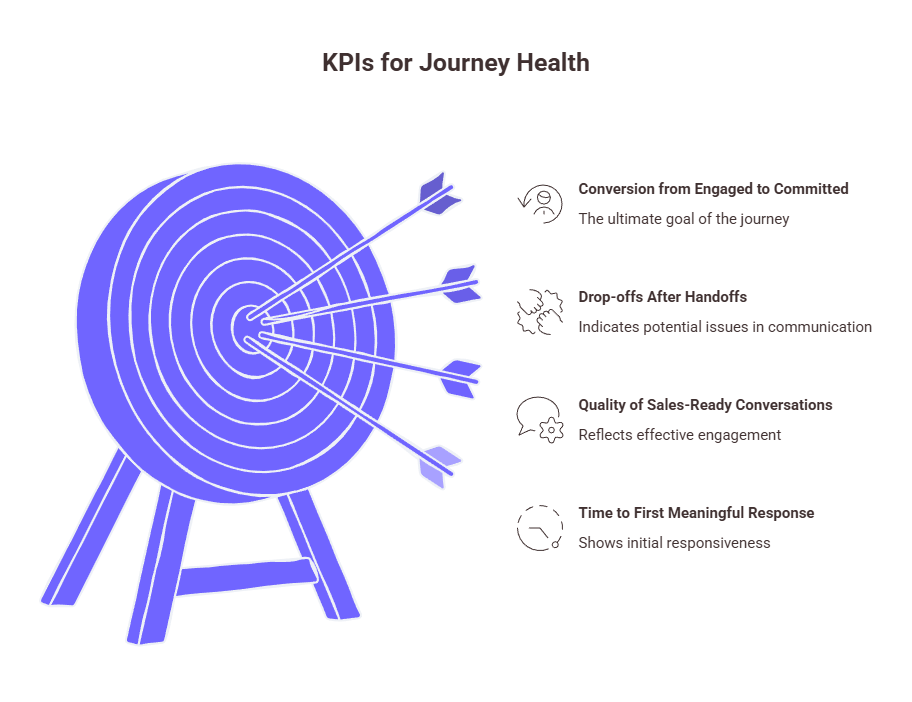
### **KPIs That Show Journey Health**
Track what reflects momentum:
- Time to first meaningful response
- Quality of sales-ready conversations
- Drop-offs after handoffs
- Conversion from engaged to committed
Talk to us about momentum
## **Where Zigment Fits In**
This is where Zigment comes into the picture.
Zigment sits **on top of HubSpot**, adding the layer HubSpot was never designed to be: stateful, decision-driven, and cross-channel by default.
At the core is a [**Conversation Graph**](https://zigment.ai/blog/the-conversation-graph) that maintains persistent memory across every interaction. email, chat, WhatsApp, SMS, web, and app. Instead of treating each touch as isolated, Zigment understands how conversations evolve and what they mean in context.
On top of that, Zigment enables goal-driven planning and [Next Best Action](https://zigment.ai/blog/next-best-action-ai-decisioning-autonomous-ai), so outreach adapts to buyer intent, hesitation, and momentum, not static rules. Enterprise teams also get governance, auditability, and human-in-the-loop controls where judgment matters.
For **mid-market and enterprise teams running HubSpot**, multiple sellers, multiple channels, and a RevOps leader accountable for pipeline speed, his leads to clear outcomes:
- Higher qualified-lead and demo-booked rates
- Faster, more relevant responses
- Stronger retention through journey continuity
HubSpot executes the work.
Zigment keeps the journey intact.
## FAQs
Q: How is "stateful" automation different from standard HubSpot workflows?
A: Standard HubSpot workflows are stateless—they trigger based on a single event (e.g., “If user clicks link, send email”) without remembering the context of previous conversations. Stateful automation retains the "memory" of the entire relationship. It understands if a buyer is currently "evaluating," "hesitant," or "waiting for approval," and adapts the next action based on that status rather than just a rigid if/then rule.
Q: Can HubSpot track "Dark Social" channels like WhatsApp and SMS effectively?
A: Out of the box, HubSpot struggles to capture the full context of conversations on private channels like WhatsApp, SMS, or direct Slack communities (often called "Dark Social"). While it can log that a message was sent, it typically cannot analyze the sentiment or intent within those messages to trigger the correct next step in the pipeline. You often need an orchestration layer sitting on top of HubSpot to stitch these conversational signals into a unified customer profile.
Q: Does tracking journey "momentum" require replacing HubSpot’s attribution models?
A: No. HubSpot’s attribution models are excellent for understanding which channels influenced revenue (marketing credit). However, tracking momentum requires a different set of metrics focused on velocity and intent, such as Time to First Meaningful Response or Sentiment Shift. You should use HubSpot for revenue reporting while layering on a solution like Zigment to track the qualitative health and speed of the deal.
Q: How does a "Conversation Graph" improve Account-Based Marketing (ABM) in HubSpot?
A: In ABM, buying decisions are made by committees, not individuals. A Conversation Graph maps interactions across multiple stakeholders at a target company, connecting the dots between a technical user’s questions and a CFO’s pricing objections. This allows revenue teams to see the account's journey holistically, rather than viewing each contact as an isolated lead in HubSpot.
Q: Is it possible to use AI for sales outreach without overriding HubSpot's system of record?
A: Yes. The ideal architecture involves using an AI orchestration layer to handle the decisioning and drafting of messages based on real-time intent, while using HubSpot as the execution and logging engine. This ensures that every AI-driven interaction is still recorded in your HubSpot CRM for reporting and compliance, without relying on HubSpot's native automation to generate the message content.
Q: What are the signs that my HubSpot data is "active" but my deals are stalled?
A: A common "false positive" in HubSpot is high activity (email opens, page visits) paired with zero progression. Signs of a stalled journey include:
Repeated visits to the same pricing page without booking a meeting.
High email open rates but no replies.
"Generic" replies (e.g., "Check back next quarter") that workflows interpret as engagement rather than a soft rejection. Identifying these requires analyzing the content of the interaction, not just the activity log.
Q: How do we prevent "automation collisions" when using multiple channels (Email, Chat, Phone)?
A: Automation collisions happen when a marketing email goes out automatically while a sales rep is in the middle of a sensitive negotiation on WhatsApp. To prevent this, your system needs a centralized decision engine that acts as a traffic controller. This engine must be able to "pause" standard marketing workflows in HubSpot the moment a high-intent conversation is detected on a different channel.
Q: What is the difference between "Event-Based" and "Intent-Based" customer journey mapping?
A:
Event-Based (HubSpot Default): Tracks mechanical actions, forms filled, buttons clicked, pages viewed. It tells you what happened.
Intent-Based: Interprets the meaning behind actions, hesitation, urgency, confusion, or purchasing power. It tells you why it happened. For complex B2B sales cycles, relying solely on event-based data often leads to premature sales outreach or missed follow-up opportunities.
Q: How does "Human-in-the-Loop" work within an automated HubSpot journey?
A: "Human-in-the-Loop" (HITL) means the system automates low-stakes coordination but flags specific moments for human review before sending. For example, an AI agent might draft a response to a complex pricing objection but queue it as a Task in HubSpot for a sales manager to approve. This allows teams to scale outreach without losing the ability to intervene on high-value deals or sensitive topics.
---
This blog is powered by Superblog. Visit https://superblog.ai to know more.
---